
Automation
WhatsApp Order Intake and Automation
The customer places the order in a chat, and nothing in the system knows about it. We close that gap with a flow that collects what the conversation gives, checks it, and turns it into an order record.
WhatsApp is a channel in this flow. Where the order gets created, which details are mandatory and when a person takes over are all set by how your business works.
Where WhatsApp orders get stuck
The problem is not WhatsApp. It is that the order stays in the conversation and never reaches a system.
- Order details are scattered across messages.
- Every customer writes the product, quantity and variant differently.
- The address and invoice details have to be asked for separately each time.
- Someone reads the message and types the same information into another system.
- At busy times a message can be missed.
- "Where is my order?" gets answered by hand, one at a time.
- The conversation and the order record end up disconnected.
How the flow is built
The flow is not one piece; it is steps that run in order. Which of them proceed automatically and which stay with a person is decided per project.
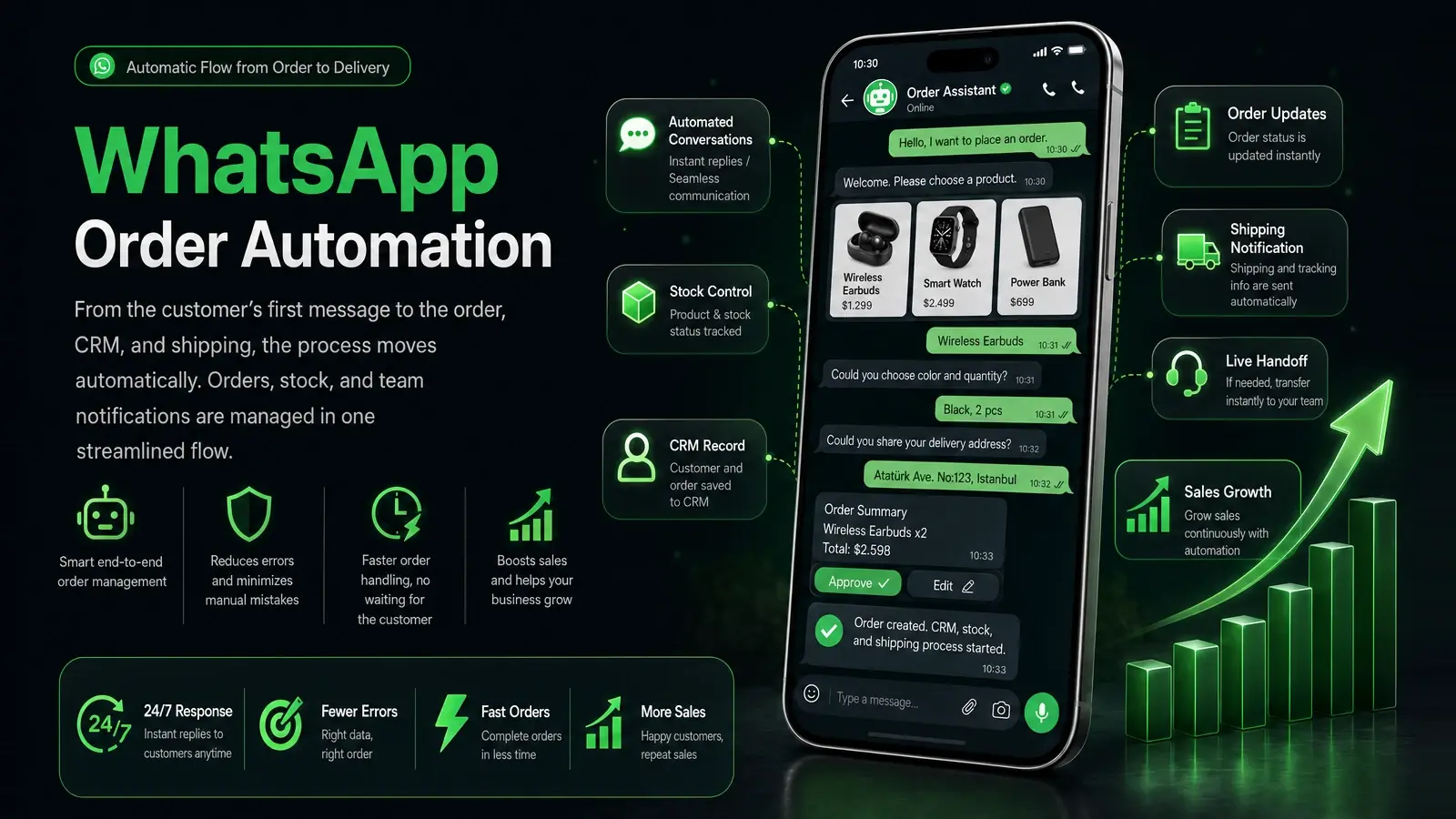
- 01Sorting the request
Working out whether an incoming message is an order or a question.
- 02Product and quantity
Settling which product, which variant and how many.
- 03Asking for what is missing
Requesting the address, invoice details or any field left blank.
- 04Validation
Checking the information is in the expected shape and the product has a match.
- 05Summary and confirmation
Showing the customer the order summary and taking their confirmation.
- 06Creating the record
Writing the order into the system that holds it.
- 07Notification
Telling the team, and telling the customer what happens next.
A simple single-product order
- The customer writes with a product name
- Variant and quantity are asked for
- The missing address is requested
- The details are validated
- An order summary is sent
- The customer confirms
- The order record is created and the team is notified
- The customer is told what happens next
Which of these steps apply depends on what you sell and on the systems you already run.
Handing over, and handling exceptions
Not every order needs to run end to end on its own. A flow that is built properly knows where to hand over.
When the conversation goes to a person
- The request is unclear, or does not map to a standard product.
- A custom price or a quote is needed.
- The customer is writing about a complaint or a return.
- Something has gone wrong with payment.
- There is an exception on delivery.
- The customer explicitly asks to speak to someone.
When something goes wrong
- If required information is missing, the flow stops and asks for it.
- If the product does not match, nothing is guessed — it asks, or it hands over.
- If a connected system does not answer, the order is not lost quietly.
- If the record could not be created, the state is flagged visibly.
The point is not to take people out of the conversation. It is to take over the repetitive part and leave the part that needs a decision to the team.
The systems it connects to
The order itself usually lives not in WhatsApp but in a system the business already runs.
Not every system can be connected to every flow. What the other side offers as an API and its terms of use govern it; we check what is possible in your case before a project starts.
Which integration method is workable depends on the WhatsApp Business setup being used and the technical conditions on the account. We settle that with you while mapping the scope.
- Ecommerce platform
- Order management system
- CRM and customer records
- ERP
- Stock and product data source
- Accounting system
- Internal APIs
- Email and notification services
Is this the right fit?
Not every WhatsApp line needs automating. Working out which side you are on early costs less than starting in the wrong place.
When it fits
- Orders arrive through WhatsApp regularly.
- Products are defined and their variants are known.
- The volume has made manual tracking error-prone.
When something else fits better
- Order volume is low and handling it by hand genuinely works.
- Almost every order needs a conversation and a custom quote.
- The aim is to send bulk unsolicited messages — that is not the work we do.
If what you need is a catalogue, a cart and online payment, the answer is probably not this flow but an ecommerce store.
If the problem is not just WhatsApp but a wider flow spanning CRM, ERP, email and internal approvals, it moves to business process automation.
If the flow grows to need its own admin screen, custom pricing rules or a permission structure, that part falls under custom software development.
Before the conversation
The answers to these largely define the scope. They do not all need to be settled.
- How do customers place orders today?
- What does an order have to contain?
- Where do product, price and stock data live?
- Where should the order record be created?
- Which steps can run automatically?
- Which situations must go to a person?
- Is there an existing ecommerce, CRM or ERP?
- How is payment taken?
- What status information should the customer get?
Frequently asked questions
Can orders be taken automatically through WhatsApp?
- They can, but not from a single ready-made template. It needs a flow built around your product structure, the details you require and where the order gets created.
Can it connect to our existing ecommerce or order system?
- You decide where the order record is created: your existing ecommerce platform, an order management system or your CRM. Which of them can be connected comes down to the access that system offers.
Can product, stock and price data be read from another system?
- Where the source is reachable, the flow reads from it — so price and stock do not have to be updated in two places.
Is the WhatsApp Business API required?
- That depends on the flow being built and on the WhatsApp Business setup you already use. We establish which method is workable after seeing the technical conditions on the account.
Tell us in a few sentences how orders reach you through WhatsApp today — and we will work out which steps can be automated.
Tell us about your project.
Write down what you have in mind in a few sentences. We will show you what we could build for it.